Microsoft Win32 Content Prep Tool
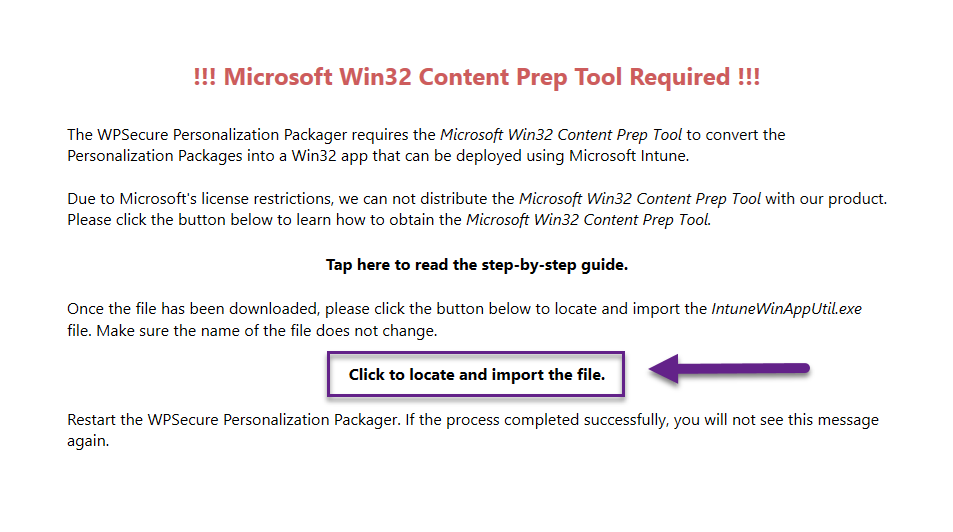
The WPSecure Personalization Packager requires the ‘Microsoft Win32 Content Prep Tool’ to convert the Personalization Packages into a Win32 app that can be deployed using Microsoft Intune.
Due to Microsoft’s license restrictions, we can not distribute the ‘Microsoft Win32 Content Prep Tool’ with our product.
The ‘Microsoft Win32 Content Prep Tool’ can be downloaded from Microsoft’s GitHub repository. We have provided the two options below.
- Option 1: Download the Microsoft Win32 Content Prep Tool directly—direct link to the ‘IntuneWinAppUtil.exe‘ file.
- Option 2: Download the file by visiting Microsoft’s GitHub project page for the Microsoft Win32 Content Prep Tool.
Option 1:
Click the link below to download the ‘Microsoft Win32 Content Prep Tool’ directly to your downloads folder.
https://github.com/microsoft/Microsoft-Win32-Content-Prep-Tool/raw/master/IntuneWinAppUtil.exe
The downloaded file will be called ‘IntuneWinAppUtil.exe‘. Please do not rename the file.
Option 2:
Same as Option 1, but we first go to the Microsoft GitHub project page for the ‘Microsoft Win32 Content Prep Tool’.
https://github.com/microsoft/Microsoft-Win32-Content-Prep-Tool
Click on the “<> Code” button and “download ZIP“.
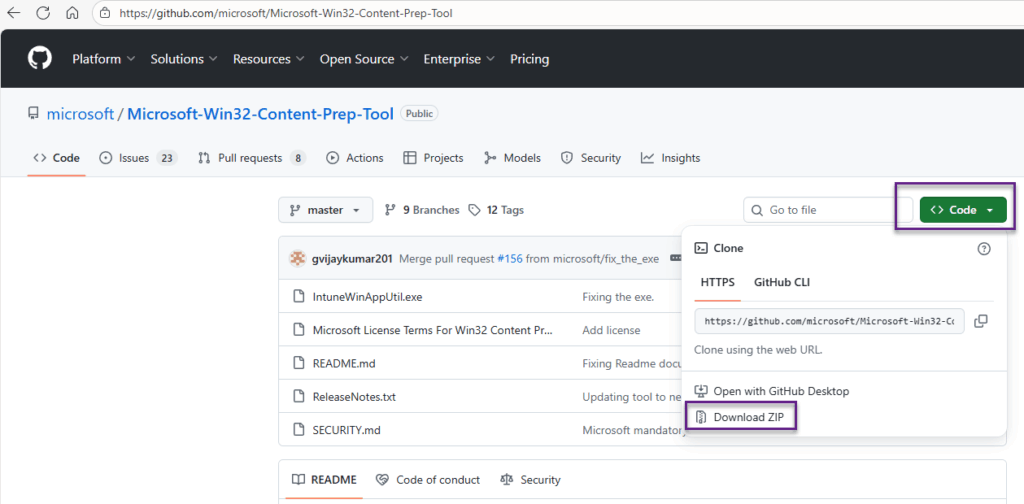
Extract the content of the downloaded ZIP file and look for a file named ‘IntuneWinAppUtil.exe‘. Extract it, but please do not rename the file.
Import the file into the WPSecure Personalization Packager.
Once the file has been downloaded, please click the button below to locate and import the ‘IntuneWinAppUtil.exe’ file at first run. Make sure the name of the file does not change. If all goes well, this will be a one-time action.